


Cisco has been building Cisco Switch solutions since the early 1990s, and its Catalyst line is still one of the most trusted names in business networking. Walk into almost any office, school, hospital, or data center, and there is a good chance a Cisco switch is quietly moving data behind the scenes.
But buying a switch is only half the job. A new switch will pass traffic right out of the box, yet it will not be secure, organized, or fast until you set it up the right way. That is where Cisco switch configuration comes in.
This guide explains Cisco network switches in plain words. You will learn the main Cisco switch series, what drives Cisco switch price, and the exact commands to set up your switch step by step. Let’s get started.
Lorem ipsum dolor sit amet, consectetur adipiscing elit. Ut elit tellus, luctus nec ullamcorper mattis, pulvinar dapibus leo.
What Are Cisco Network Switches and Why Do They Matter?
A switch is a device that connects computers, printers, phones, cameras, and servers inside one network. It reads the address on each data packet and sends it only to the device that needs it. This makes your network faster and safer than older devices like hubs, which send data to everyone.
Cisco network switches stand out for three reasons:
- Reliability: They are built to run for years with very little downtime.
- Security: Features like port security, access lists, and encryption help protect your data.
- Scale: You can start with a small 8 port switch and grow to thousands of ports.
Cisco switches run on IOS or IOS XE, the software you use to configure them. Once you learn the basics, you can manage almost any Cisco switch.
Many models also support PoE, or Power over Ethernet. PoE sends power and data through one cable, so you can run IP phones, Wi-Fi access points, and cameras without extra power adapters.
Cisco Switch Series and Models: Which One Fits You?
Cisco offers many Cisco switch models, and the names can feel confusing at first. Here is a simple way to sort them.
Cisco Catalyst Switches
Cisco Catalyst switches are the most popular family. They fit most business needs.
- Catalyst 1000: Entry level. Good for small offices and branches.
- Catalyst 9200: Small to mid size networks that need strong security.
- Catalyst 9300: A top pick for medium and large offices. It supports stacking, so several switches work as one.
- Catalyst 9400 and 9500: Built for large campus and distribution layers.
- Catalyst 9600: Made for the core layer of large enterprises.
Other Cisco Switch Series
The Cisco Business series (110, 220, and 350) suits small companies that want easy setup. Cisco Meraki switches are managed from the cloud, which helps if you run many sites. Cisco Nexus switches are built for data centers.
Cisco Switch Price: What to Expect
Cisco switch price depends on a few things: the number of ports, port speed (1G, 10G, 25G, or 100G), PoE support, Layer 2 or Layer 3 features, and license type. A small 8 port access switch costs far less than a modular core switch, which can run into several lakhs. Also plan for licenses and support plans, since they protect you when something goes wrong.
Layer type matters too. A Layer 2 switch moves data inside one network. A Layer 3 switch can also route traffic between VLANs, so you may not need a separate router. However, if your network requires dedicated routing capabilities, you can explore Cisco Routers for routing and WAN connectivity. Most Catalyst 9000 models support Layer 3 features.
Tip: Pick a switch that fits your needs for the next 3 to 5 years, not just today. To compare options and ask for a quote, visit the Cisco switch page at Inexa.
Before You Start Cisco Switch Configuration
Get these items ready first:
- A console cable (USB to RJ45) and a laptop
- Terminal software such as PuTTY or Tera Term
- Your IP plan: management IP, subnet mask, and gateway
- A list of VLANs and the ports that will use them
- Strong passwords, stored safely
You can check the software version any time with the show version command.
Plug the console cable into the console port, open your terminal app at 9600 baud, and press Enter. You should see the switch prompt.
Cisco Switch Configuration Step by Step
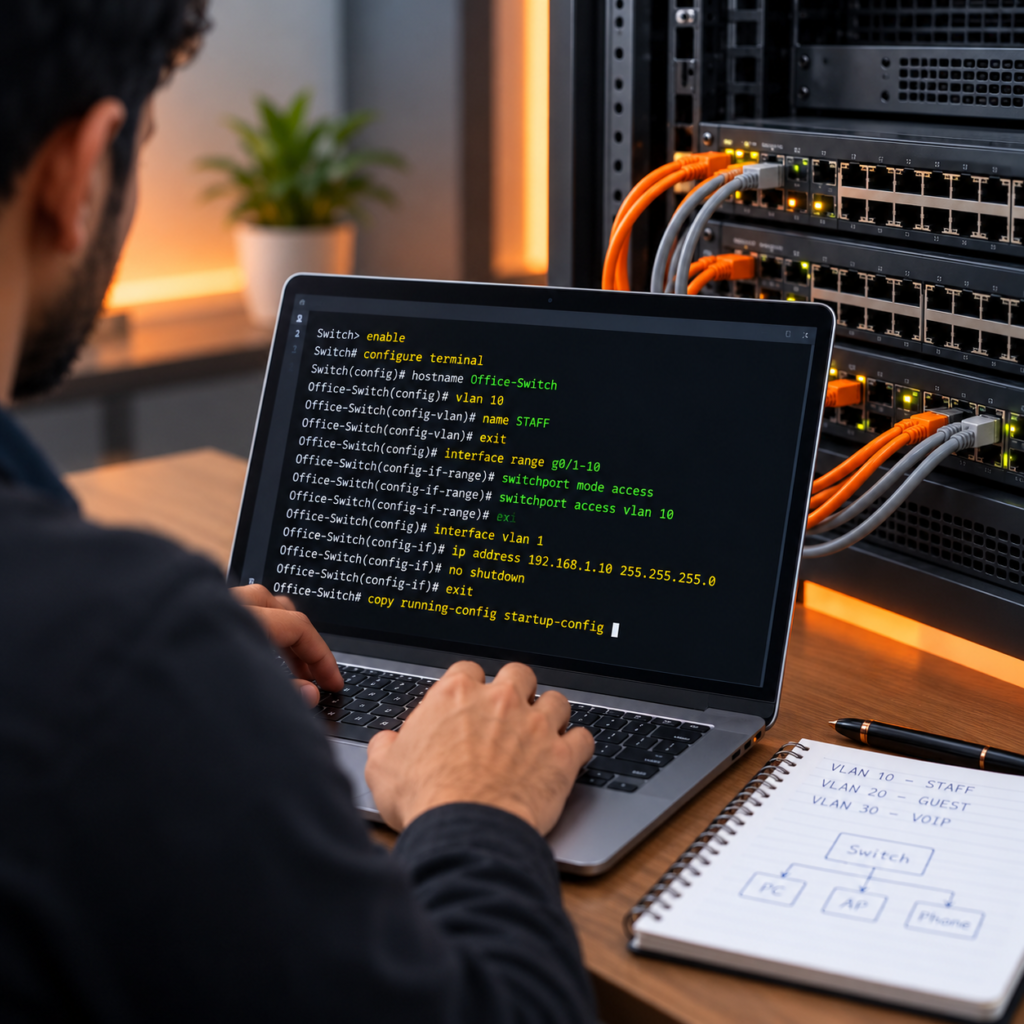
Connect your laptop to the Cisco switch using a console cable. Open PuTTY, select the COM port, and set the baud rate to 9600. Enter enable, followed by configure terminal. Set a hostname, such as Office-Switch, to identify the device.
Configure a management IP address on the appropriate VLAN interface and activate it using no shutdown. Create VLANs to organize devices by role. For example, use vlan 10 and name STAFF. Assign ports to the appropriate VLANs and configure SSH for secure remote access.
Verify settings using show running-config, show vlan brief, and show ip interface brief. Save changes using copy running-config startup-config.
Commands vary by switch model and software version. Refer to the official Cisco SSH Configuration Guide.
Cisco Switch Configuration Best Practices
Once your switch is up and running, these habits keep it healthy.
- Change all default passwords and use strong ones.
- Shut down unused ports and move them to an unused VLAN.
- Turn on port security to limit how many devices can use one port.
- Keep your IOS software up to date.
- Back up your configuration often.
- Use Spanning Tree Protocol (STP) to prevent network loops.
- Label cables and ports, and write down every change.
Also avoid these common mistakes: forgetting to save, leaving Telnet on, putting every device in VLAN 1, and skipping backups. Small habits like these prevent most network problems.
Final Thoughts
Cisco network switches are powerful, and Cisco switch configuration is easier than it looks. Once you know the series, the price factors, and the core commands, you can build a fast and secure network. If you need help choosing the right Cisco Catalyst switches, see the Cisco switch range at Inexa. Our team can match a model to your budget and growth plans, so your network stays fast today and ready for tomorrow.
Frequently Asked Questions
They connect devices in a network and send data only to the device that needs it. You will find them in offices, schools, hospitals, and data centers.
The Catalyst 1000 or the Cisco Business 350 is enough for most small teams. If you want stronger security and room to grow, choose the Catalyst 9200. Meraki works well if you prefer cloud control.
It depends on ports, speed, PoE, features, and licenses. Entry level switches cost much less than modular core switches. Contact a trusted supplier like Inexa for a current quote.
Use a console cable and terminal software on your laptop. After you set an IP address and turn on SSH, you can log in over the network.
Running-config is the live setup stored in RAM, and it is lost on restart. Startup-config is saved in NVRAM and loads at boot. Use copy running-config startup-config to save your work.
Inexa Technology supplies Cisco switches for businesses, offices, and enterprise networks. You can explore the Cisco switch range at Inexa and contact the team for product recommendations, pricing, availability, and support.
Explore our product range: Cisco Routers | Cisco Switches | Cisco Firewall | Cisco UCS |Cisco Room Kit | Cisco Video Conferencing
Need Cisco Products or Expert Support?
Looking for the right Cisco products for your business? Explore reliable Cisco networking solutions tailored to your business requirements, infrastructure, and budget.